Onward maintains a cashback balance for each customer, along with the ledger entries behind it. How the customer spends that balance depends on where the shop sells.
If your platform also awards credit, you can add or reverse it through the Rewards API. You never post redemptions.
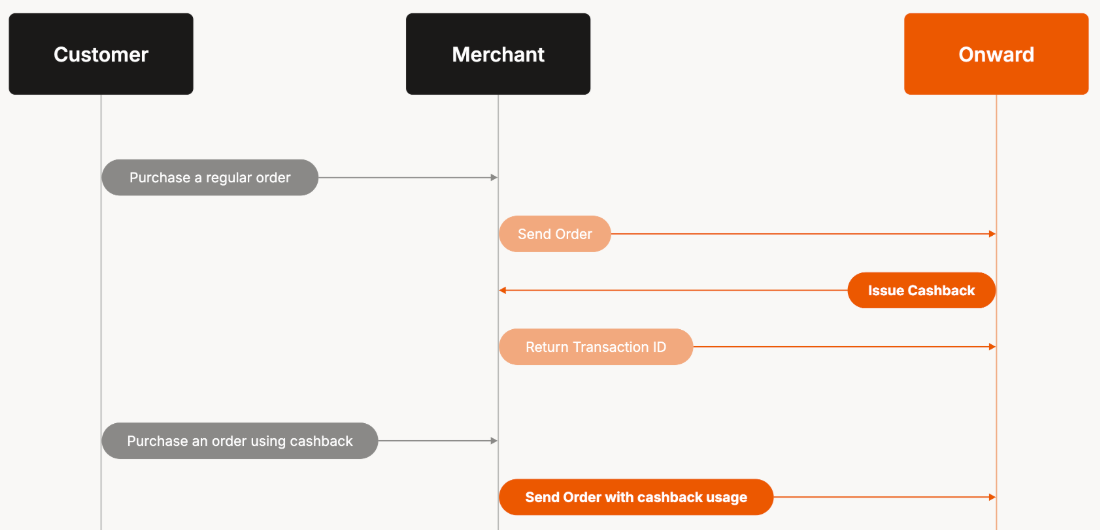
Your platform holds the spendable balance. When a customer earns cashback, Onward records it in the ledger and calls your "Issue a reward" callback API so you can issue the same amount on your side. When the customer spends the balance, you tell Onward through the Orders API so the ledger can record the redemption.
- Register your callback base URL with Onward as described in Registering Callback Endpoint. Without it, Onward still records the credit in the ledger but has nowhere to send it
- Send every order, not only protected ones. Customers can spend rewards on an unprotected order, so Onward needs to see those orders to keep its balance in step with yours
When you send orders through the Orders API, Onward calculates the cashback each order earns and adds it to the customer's ledger. As the customer's balance changes on the ledger, we call your system at your registered callback URL to issue or update the balance of your e-commerce platform's preferred redemption method (discount code, store credit, etc). When the customer spends some of it, you include that amount on the order you send to Onward. That way both balances stay in sync.
Only protected orders earn cashback, but customers can spend their balance on any order. That's why Onward needs to see every order you process, not just the protected ones.
You can stop specific sales channels from earning cashback. Send source_name on each order (for example web, phone, or a marketplace name), then your Onward account representative can configure Cashback eligibility exceptions for you.
Create each order with POST /orders when the customer places it. Onward works out the credit from the line item totals after discounts. The response returns the customer object along with their updated reward balance, so you don't need a separate request to check it.
- https://app.useonward.com/api/v1https://app.useonward.com/api/v1/orders
curl -i -X POST \
  https://app.useonward.com/api/v1/orders \
  -H 'Accept: application/json' \
  -H 'Content-Type: application/json' \
  -H 'X-API-Key: YOUR_API_KEY_HERE' \
  -d '{
    "shop_order_id": "18282",
    "shop_order_number": "W-94713",
    "subtotal_price": {
      "cents": 1299,
      "currency": "USD"
    },
    "subtotal_price_presentment": {
      "cents": 1299,
      "currency": "USD"
    },
    "total_discounts_price": {
      "cents": 1299,
      "currency": "USD"
    },
    "total_discounts_price_presentment": {
      "cents": 1299,
      "currency": "USD"
    },
    "total_shipping_price": {
      "cents": 1299,
      "currency": "USD"
    },
    "total_shipping_price_presentment": {
      "cents": 1299,
      "currency": "USD"
    },
    "total_tax_price": {
      "cents": 1299,
      "currency": "USD"
    },
    "total_tax_price_presentment": {
      "cents": 1299,
      "currency": "USD"
    },
    "total_price": {
      "cents": 1299,
      "currency": "USD"
    },
    "total_price_presentment": {
      "cents": 1299,
      "currency": "USD"
    },
    "amount_protected": {
      "cents": 1299,
      "currency": "USD"
    },
    "amount_protected_presentment": {
      "cents": 1299,
      "currency": "USD"
    },
    "purchased_quote_token": "c0740f7e3d4718a64fd9ce18101961d210d1c61c8c8afd62f95d62d8c433347b$$qkJClv/+sWfpOfPqp4sI46PxzBuBCW4eEDKsL4q87aFhRT9mdCpIuEWwuRuvbkX4BS8=--AUnUz8WgunyUiZ4o--nnYz0Lj5WsxSqsUxtBpIIQ==",
    "created_at": "2024-11-26T17:32:28Z",
    "financial_status": "paid",
    "source_name": "phone",
    "customer": {
      "shop_customer_id": "6072418623",
      "first_name": "Sally",
      "last_name": "Loo",
      "email": "sally@example.com",
      "phone_number": "+13105551234"
    },
    "shipping_address": {
      "address1": "123 Main St",
      "address2": "Unit 50",
      "province_code": "CA",
      "city": "Los Angeles",
      "postal_code": "90210",
      "country_code": "US",
      "phone_number": "+13105551234"
    },
    "line_items": [
      {
        "shop_line_item_id": "816721",
        "shop_product_id": "142",
        "shop_variant_id": "7261",
        "name": "Cool T-shirt - Red",
        "unit_price": {
          "cents": 1299,
          "currency": "USD"
        },
        "total_price": {
          "cents": 1299,
          "currency": "USD"
        },
        "total_price_presentment": {
          "cents": 1299,
          "currency": "USD"
        },
        "quantity": 2,
        "image_url": "https://placecats.com/neo/300/200.png",
        "grams": 24,
        "is_protected": true,
        "requires_shipping": true,
        "refunded_quantity": 1,
        "refunded_price": {
          "cents": 1299,
          "currency": "USD"
        },
        "refunded_price_presentment": {
          "cents": 1299,
          "currency": "USD"
        }
      }
    ]
}'{ "shop_order_id": "18282", "shop_order_number": "W-94713", "lookup_key": "fa524f69d568a1b2c3d4e5f6", "subtotal_price": { "cents": 1299, "currency": "USD" }, "subtotal_price_presentment": { "cents": 1299, "currency": "USD" }, "total_discounts_price": { "cents": 1299, "currency": "USD" }, "total_discounts_price_presentment": { "cents": 1299, "currency": "USD" }, "total_shipping_price": { "cents": 1299, "currency": "USD" }, "total_shipping_price_presentment": { "cents": 1299, "currency": "USD" }, "total_tax_price": { "cents": 1299, "currency": "USD" }, "total_tax_price_presentment": { "cents": 1299, "currency": "USD" }, "total_price": { "cents": 1299, "currency": "USD" }, "total_price_presentment": { "cents": 1299, "currency": "USD" }, "protection_paid": { "cents": 1299, "currency": "USD" }, "amount_protected": { "cents": 1299, "currency": "USD" }, "amount_protected_presentment": { "cents": 1299, "currency": "USD" }, "created_at": "2024-11-26T17:32:28Z", "financial_status": "paid", "source_name": "phone", "customer": { "shop_customer_id": "6072418623", "first_name": "Sally", "last_name": "Loo", "email": "sally@example.com", "phone_number": "+13105551234", "rewards": [ … ] }, "shipping_address": { "address1": "123 Main St", "address2": "Unit 50", "province_code": "CA", "city": "Los Angeles", "postal_code": "90210", "country_code": "US", "phone_number": "+13105551234" }, "line_items": [ { … } ] }
When a customer earns cashback, Onward records it in the ledger and calls your "Issue a reward" callback API so you can issue the same amount on your side. Depending on your cashback settings this may be immediately or after a configured delay. For example, if your shop issues cashback 15 days after the order, Onward calls you on day 15. Issue the credit when you get the call.
- https://api.your-store.com/onwardhttps://api.your-store.com/onward/customers/{shopCustomerId}/reward
curl -i -X POST \
  https://api.your-store.com/onward/customers/7461/reward \
  -H 'Accept: application/json' \
  -H 'Content-Type: application/json' \
  -H 'X-API-Key: YOUR_API_KEY_HERE' \
  -d '{
    "customer": {
      "shop_customer_id": "7461",
      "first_name": "Sally",
      "last_name": "Loo",
      "email": "sally@example.com",
      "phone_number": "+13105551234"
    },
    "to_issue_amount": {
      "cents": 1299,
      "currency": "USD"
    },
    "onward_reward_transaction_id": 456001
}'onward_reward_transaction_idstays the same across retries. If a request repeats an ID you've already seen, return the sameshop_transaction_idand don't issue a second credit.
{
  "shop_transaction_id": "rw_789",
  "shop_reward_id": "1234567890"
}
Onward saves shop_transaction_id on the ledger entry as proof the credit was delivered, and uses it to look up that credit later. It saves shop_reward_id on the customer's reward and uses it to address that reward. Return the same shop_reward_id for every credit that belongs to the same customer. Onward keeps the first one it receives.
Onward treats any other response, or a 200 without a valid shop_transaction_id or shop_reward_id, as a failure and retries.
Your shop decides how customers spend their cashback at checkout. All Onward needs is the amount they spent, which you send with the order. When a customer places the order using their cashback at your checkout, send the amount as reward_used on POST /orders, in the shop's currency. If the customer's currency is different, add reward_used_presentment.
Spent cashback counts as a discount. Include it in total_discounts_price and send line item totals with it already taken off. The customer doesn't earn new credit on the part of the order they paid for with their cashback.
Onward only records as much as the customer's spendable balance covers. The reward_used in the response is what Onward recorded. If it's less than what you sent, your balance and Onward's no longer match.
reward_used is the order's running total, not the change since your last report. If an order edit changes how much reward applies, send the new total on PATCH /orders/{shopOrderId}:
| You send | Onward |
|---|---|
| The same total again | Records nothing |
| A higher total | Takes the difference off the balance |
| A lower total | Credits the difference back |
Leaving reward_used out of an update leaves the recorded amount as it is.